

Introduction:
Staying organized and becoming transparent among team members is more critical than ever in workplaces. Teams work across multiple priorities at the same time, deadlines, and collaborators, mostly across different time zones. Without the right systems in place, projects can quickly lead to chaos, becoming unmanageable.
Modern project management tools are built to simplify the messy parts of managing work. These platforms help teams plan, track, and deliver work with clarity and confidence. As per business research insights, the global project-management software market is growing fast: projected to reach roughly USD 9.36 billion in 2025, this shows how in-demand it is.
In this article, we can explore how choosing the right tool can transform how your team works, making every process smoother, clearer, and more productive.
Why Use Project-Management Tools?
Before we go deep into specific tools, it helps to understand what makes them so useful, especially compared with old-school methods like spreadsheets or email.
- Better organization and visibility. With tools that include dashboards, Gantt charts, and resource-tracking, teams get a clear overview of who’s doing what, and when. This reduces confusion and helps avoid missed deadlines.
- Improved collaboration. Modern tools mostly integrate messaging, file sharing, and real-time updates, something that’s especially helpful for remote or hybrid teams. Communication becomes clearer, and fewer tasks slip through the cracks.
- Automation and efficiency. Many project-management platforms now offer automation features: scheduling, reminders, reporting, and even predictive analytics. This saves time, reduces manual work, and helps teams stay on track.
- Better project outcomes. According to a Business Management Daily magazine article, 77% of high-performing projects use dedicated project-management software, a strong indicator of how useful these tools can be when implemented well.
Top Project Management Tools That Simplify Work:
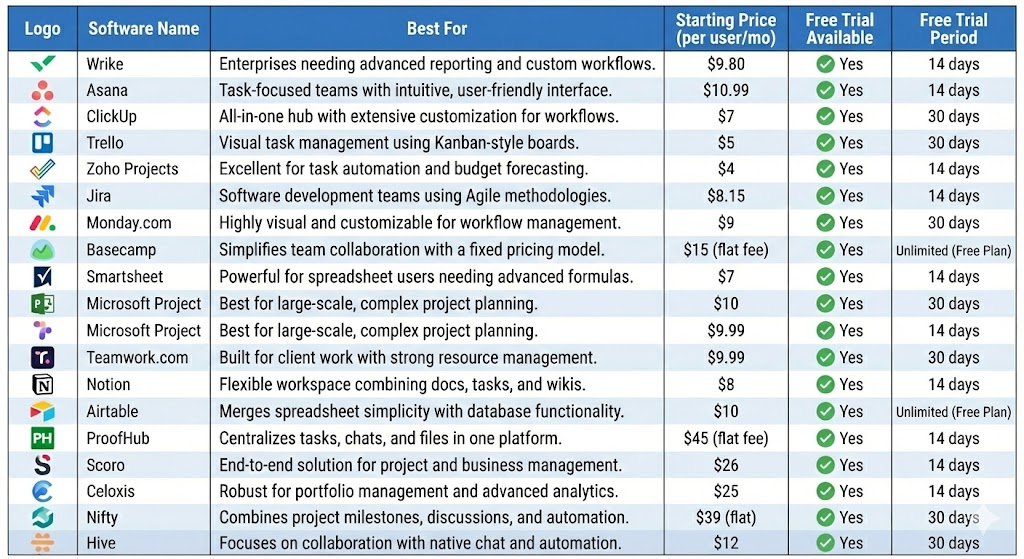
Here’s a quick look at the leading tools many teams rely on. Each has its own strengths, depending on your team size, project type, and what you need from a tool.
| Tool | Best For | Key Highlights |
| Wrike | Larger teams, complex multi-phase projects | Strong dashboards, highly flexible, great for cross-functional work |
| Asana | Teams wanting simple, intuitive task tracking | Clean interface, works well for marketing, product launches, and general team projects |
| ClickUp | Small to medium teams needing an all-in-one tool | Tasks, docs, time tracking, automation; very flexible |
| Trello | Smaller teams or light projects | Visual Kanban boards, simple, great for quick planning at a glance |
| Zoho Projects | Small to mid-sized teams | Affordable, solid-core PM features |
| Jira | Software development and technical teams | Powerful workflows, issue tracking, ideal for dev/product teams |
| Monday.com | Teams wanting customization and automation | Template-rich, flexible workflows, strong automation |
| Basecamp | Small teams focused on communication | Simple, low-friction collaboration, less heavy on advanced PM features |
| Smartsheet | Teams familiar with spreadsheets | Spreadsheet-style interface with advanced PM and reporting features |
| Microsoft Project | Large organisations, formal project management | Strong scheduling, resource planning, and enterprise-level structure |
| Teamwork.com | Agencies and service-based teams | Strong collaboration, task, and resource tracking |
| Notion | Small teams or hybrid work/project tracking | Versatile workspace for docs, notes, databases, and basic PM |
| Airtable | Data-heavy, complex, structured projects | Spreadsheet–database hybrid, great for collaboration and data management |
| ProofHub | Small to medium teams wanting simplicity | Unified tasks, time tracking, and communication in one place |
| Scoro / Celoxis / Nifty / Hive / Project Planners | Teams needing advanced planning and reporting | A mix of resource planning, reporting, and task automation |
| Automation & Integrations (General Trend) | Teams wanting smoother workflows | Modern tools automate repetitive tasks and integrate with comms, docs, time tracking, etc. |
What To Look For When Choosing a Project-Management Tool
When evaluating tools, here are some features and factors to focus on:
- Usability & ease of adoption. A tool that’s intuitive is more likely to be adopted widely by your team. Complexity can slow down usage, especially with smaller teams or individuals new to PM software.
- Task tracking & workflow flexibility. Whether your work follows simple task lists, Kanban boards, or complex timelines with dependencies, choose a tool that accommodates your workflow style.
- Collaboration & communication. Features like comments, document sharing, real-time updates, and integrations with messaging tools help reduce friction, especially for remote or hybrid teams.
- Resource management & scheduling. For larger or complex projects, tools that support resource loading, time tracking, deadlines, and Gantt charts become important.
- Automation & reporting. Automated reminders, recurring tasks, dashboards, and reports can save time and improve oversight, especially for teams juggling multiple projects.
- Scalability & flexibility. As your team or project grows, the tool should accommodate changing needs; more users, more complex workflows, integrations, and possibly automation.
- Cost and value. Evaluate the price (free tier, per-user pricing, feature limits) against benefits. For small teams, simplicity and affordability might matter more than advanced features.
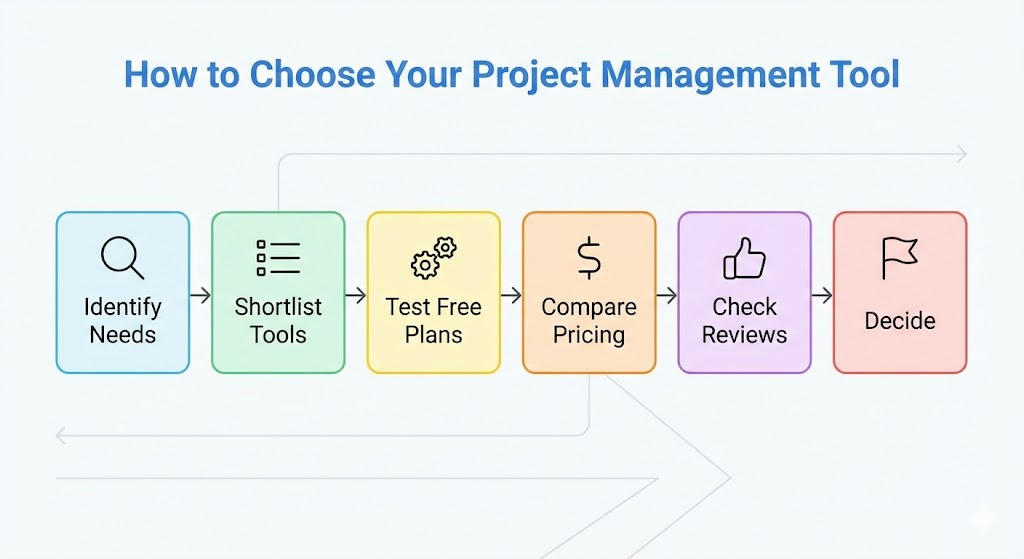
A clear roadmap to PMP certification helps you understand project workflows, stakeholder needs, and real-world coordination, making it easier to choose the right project management tools. With PMP-aligned knowledge, you can identify which platforms support planning, scheduling, collaboration, automation, and reporting, ensuring the tool you select truly simplifies work and boosts productivity.
How PM Tools Simplify Collaboration and Task Tracking for Remote or Hybrid Teams
With remote or hybrid work becoming common, project-management tools are key players in these work settings:
- They provide a single source of truth; everyone sees the same tasks, statuses, deadlines, and documents, regardless of location.
- Real-time updates and notifications keep everyone aligned, even across time zones. This reduces delays and helps maintain momentum.
- Teams can collaborate asynchronously: assign tasks, comment on them, and upload documents, without needing meetings or constant emails.
- Tools mostly integrate with communication platforms, document sharing, and cloud storage, creating a seamless workflow between planning, execution, and communication.
These features reduce dependence on email, help avoid confusion, and make remote teamwork much smoother.
Why Modern Businesses Prefer PM Tools Over Spreadsheets or Email
- Centralized data and clarity: Instead of scattered emails and multiple spreadsheets, project-management tools bring all tasks, documents, and deadlines into one place. This improves transparency and makes it easy to track progress.
- Reduced errors and delays: With real-time updates and accountability, fewer tasks fall through the cracks, reducing the risk of missed deadlines or miscommunication.
- Time savings & productivity: Automation, reminders, and collaboration features reduce manual effort. PM software helps save hundreds of hours annually in many organizations.
- Better visibility & reporting: Managers and stakeholders can get instant insights on progress, resource use, and upcoming deadlines. This helps in planning, resource allocation, and responding quickly to issues.
Conclusion
With growing complexity in work and increasing shift towards remote or hybrid teams, project management tools have become indispensable. From simple task tracking to advanced automation, these platforms help teams stay aligned, organized, and efficient. Whether you are a small startup, a mid-sized team, or a large organization, there’s likely a tool that fits your needs.
The keys to success are: find the tool for your team size and workflow, ensure ease of use, support collaboration and automation, and slowly build adoption without challenging the team.